A WordPress login redirect loop occurs when authentication succeeds but the login session fails to persist, causing WordPress to repeatedly redirect users between wp-login.php and /wp-admin. Because this issue often appears without any visible error, it can be difficult to diagnose.
This article outlines 10 independent and proven methods to fix the WordPress login redirect loop, from basic WordPress-level checks to advanced configuration and server-level solutions. Any single method may resolve the issue, so it’s not necessary to follow them in order.
Common Symptoms
-
Login page reloads after clicking Log In
-
/wp-adminredirects towp-login.php?reauth=1 -
Correct credentials do not create a persistent session
-
Cookies are set but login does not persist
-
No PHP or WordPress error is displayed
Method 1: Clear Browser Cache and Cookies
WordPress authentication relies on cookies.
-
Clear cookies for the site
-
Try logging in via an incognito/private window
-
Disable browser extensions temporarily
If login works in incognito mode, the issue is browser-related.
Method 2: Disable All Plugins
A plugin may interfere with authentication or cookie handling.
Using FTP or File Manager:
wp-content/plugins → plugins_old
If login works:
-
Rename the folder back
-
Reactivate plugins one by one to identify the cause
Method 3: Switch to a Default Theme
Themes can override login hooks or session logic.
wp-content/themes/your-active-theme → your-active-theme_old
WordPress will automatically fall back to a default theme.
Method 4: Verify Site URL and Home URL (phpMyAdmin)
Mismatched URLs are a very common cause of redirect loops.
In phpMyAdmin → wp_options, run:
SELECT option_name, option_value
FROM wp_options
WHERE option_name IN ('siteurl','home');
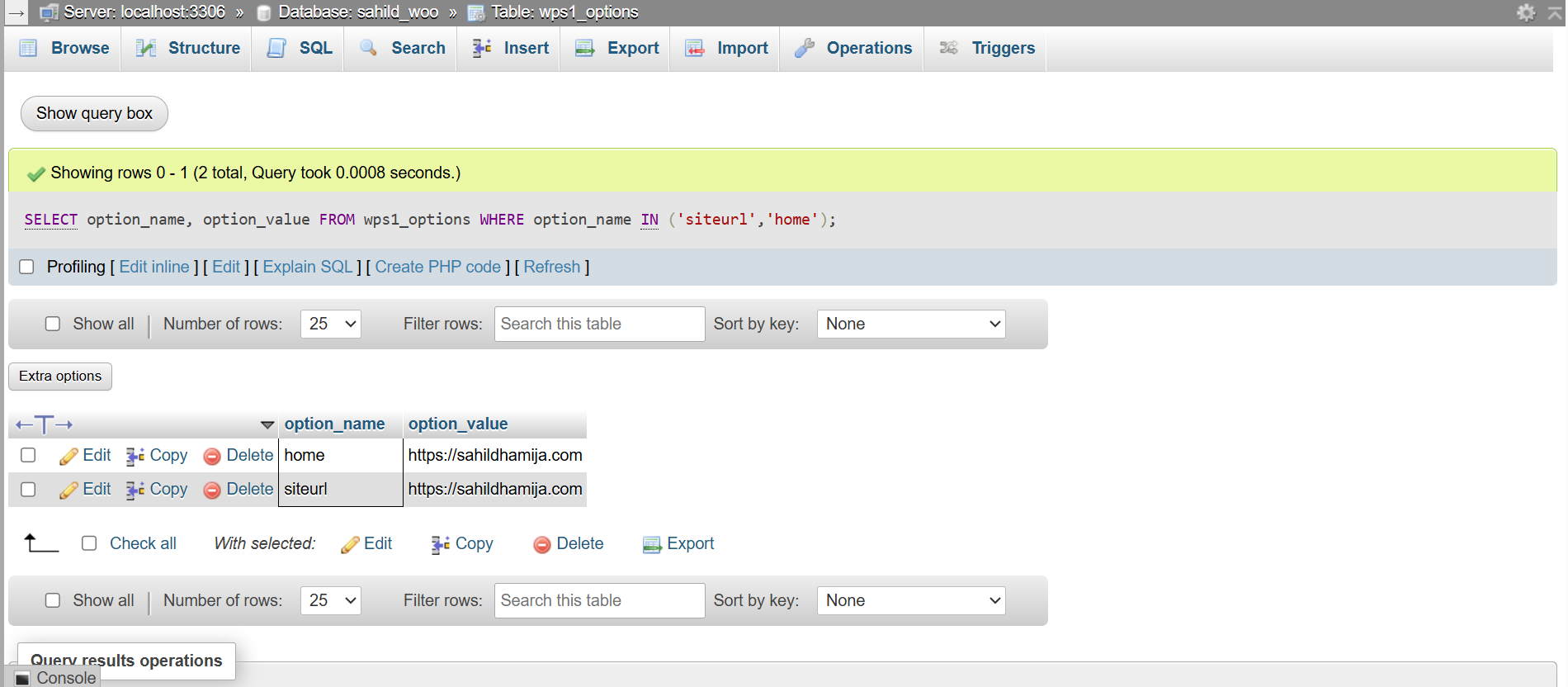
Ensure:
-
Both values are identical
-
Protocol matches (
httpsvshttp) -
No extra slashes or incorrect subdirectories
Method 5: Reset the .htaccess File
Incorrect rewrite rules or forced redirects can break authentication.
Replace .htaccess with default WordPress rules:
# BEGIN WordPress
<IfModule mod_rewrite.c>
RewriteEngine On
RewriteRule .* - [E=HTTP_AUTHORIZATION:%{HTTP:Authorization}]
RewriteBase /
RewriteRule ^index\.php$ - [L]
RewriteCond %{REQUEST_FILENAME} !-f
RewriteCond %{REQUEST_FILENAME} !-d
RewriteRule . /index.php [L]
</IfModule>
# END WordPress
Then resave permalinks from Settings → Permalinks
Method 6: Review and Normalize wp-config.php Defines
Misconfigured constants can silently break login sessions, especially on HTTPS or proxy setups.
Add or verify the following minimal and safe configuration:
// Ensure WordPress detects HTTPS correctly
if (
(isset($_SERVER['HTTP_X_FORWARDED_PROTO']) && $_SERVER['HTTP_X_FORWARDED_PROTO'] === 'https')
|| (isset($_SERVER['HTTPS']) && $_SERVER['HTTPS'] === 'on')
) {
$_SERVER['HTTPS'] = 'on';
}


// Lock WordPress URLs
define('WP_HOME', 'https://example.com');
define('WP_SITEURL', 'https://example.com');


// Force SSL in admin
define('FORCE_SSL_ADMIN', true);
Avoid forcing SERVER_PORT or defining conflicting cookie constants unless absolutely required.
Method 7: Reinstall WordPress Core Files
Corrupted core files can affect authentication.
From the site root:
cd /home/username/public_html
tar czf wp-backup-before-core-fix.tar.gz wp-config.php wp-content
wget https://wordpress.org/latest.tar.gz
tar xzf latest.tar.gz
rm -rf wp-admin wp-includes
cp -r wordpress/wp-admin .
cp -r wordpress/wp-includes .
cp wordpress/*.php .
rm -rf wordpress latest.tar.gz
chown -R username:username .
find . -type d -exec chmod 755 {} \;
find . -type f -exec chmod 644 {} \;
This replaces only core files and preserves content.
Method 8: Check Database Structure via phpMyAdmin
Authentication relies heavily on the wp_users and wp_usermeta tables.
In phpMyAdmin, visually inspect:
-
wp_users -
wp_usermeta
Verify that:
-
IDexists and is a PRIMARY KEY -
AUTO_INCREMENT is enabled
-
No duplicate IDs exist
Run:
CHECK TABLE wp_users;
CHECK TABLE wp_usermeta;
If structural issues are present, repairing tables in place is unreliable.
Method 9: Regenerate Authentication Keys and Salts
Corrupted or reused authentication keys can invalidate login sessions even when credentials are correct.
Generate fresh keys from: https://api.wordpress.org/secret-key/1.1/salt/
Replace all existing keys in wp-config.php:
define('AUTH_KEY', 'new-random-string');

define('SECURE_AUTH_KEY', 'new-random-string');

define('LOGGED_IN_KEY', 'new-random-string');

define('NONCE_KEY', 'new-random-string');

define('AUTH_SALT', 'new-random-string');

define('SECURE_AUTH_SALT', 'new-random-string');

define('LOGGED_IN_SALT', 'new-random-string');

define('NONCE_SALT', 'new-random-string');
Method 10: Advanced Server-Level Session & Configuration Checks (VPS / Root Only)
If the redirect loop persists after all WordPress-level methods, server-side session handling must be verified.
Verify PHP Session Path
php -i | grep session.save_path
Expected default on cPanel:
/var/cpanel/php/sessions/ea-phpXX
Restore Session Directory Ownership and Permissions
chown -R root:root /var/cpanel/php/sessions
find /var/cpanel/php/sessions -type d -exec chmod 1733 {} \;
Restore SELinux Contexts (AlmaLinux / Rocky / RHEL)
semanage fcontext -d "/var/cpanel/php/sessions(/.*)?"
restorecon -Rv /var/cpanel/php
Remove Custom Apache Userdata Overrides
rm -rf /etc/apache2/conf.d/userdata/ssl/2_4/username
/usr/local/cpanel/scripts/rebuildhttpdconf
systemctl restart httpd
Validate configuration
httpd -t
Restart PHP-FPM and Apache
systemctl restart ea-php81-php-fpm
systemctl restart httpd
Conclusion
WordPress login redirect loops can be frustrating because there isn’t a single cause behind them. The issue can originate from browser cookies, plugins, themes, URL mismatches, misconfigured constants, corrupted database tables, or server-level session handling often without producing a clear error message.
Taking a mindful approach to WordPress administration helps prevent issues like this in the future. This includes keeping WordPress core, themes, and plugins updated, maintaining regular backups, and monitoring security and server configurations.
If you still feel unsure at any point, a step-by-step video walkthrough can make the process easier. A video tutorial covering these methods will be added here soon to help you visually follow along and fix the issue with confidence.