
Step 1
Deploy Ubuntu server from DigitalOcean dashboard.

Step 2
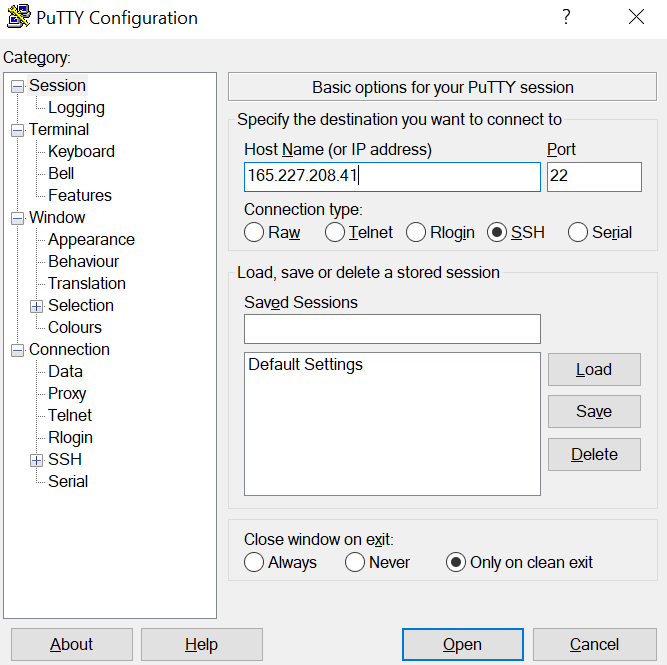
Login via SSH. You can find the login detain when you click on the deployed sever as it showed in the image.
Step 3
Update system packages
sudo apt-get update && sudo apt-get dist-upgrade -y
Step 4
Install MATE desktop
sudo apt-get install --no-install-recommends ubuntu-mate-core ubuntu-mate-desktop -y
Step 5
Install XRDP
sudo apt-get install mate-core mate-desktop-environment mate-notification-daemon xrdp -y
Step 6
Add user
adduser {yourusername}
Step 7
Make that user admin
usermod -aG admin {yourusername}
Step 8
Make that user sudo
usermod -aG sudo {yourusername}
Step 9
Switch as new user
su - {yourusername}
Step 10
Connect to MATE desktop environment via XRDP
echo mate-session> ~/.xsession
Step 11
Manually clone /etc/skel/ to /home/user directory.
sudo cp /home/{yourusername}/.xsession /etc/skel
Step 12
Restart XRDP service
sudo service xrdp restart
Step 13
Connect to remote desktop connection







I am a student of BAK College. The recent paper competition gave me a lot of headaches, and I checked a lot of information. Finally, after reading your article, it suddenly dawned on me that I can still have such an idea. grateful. But I still have some questions, hope you can help me.
I am a student of BAK College. The recent paper competition gave me a lot of headaches, and I checked a lot of information. Finally, after reading your article, it suddenly dawned on me that I can still have such an idea. grateful. But I still have some questions, hope you can help me.
The point of view of your article has taught me a lot, and I already know how to improve the paper on gate.oi, thank you. https://www.gate.io/uk/signup/XwNAU
I may need your help. I’ve been doing research on gate io recently, and I’ve tried a lot of different things. Later, I read your article, and I think your way of writing has given me some innovative ideas, thank you very much.
I may need your help. I tried many ways but couldn’t solve it, but after reading your article, I think you have a way to help me. I’m looking forward for your reply. Thanks.
I may need your help. I tried many ways but couldn’t solve it, but after reading your article, I think you have a way to help me. I’m looking forward for your reply. Thanks.